Export device position data
During tracking, GPS devices send data to the Service Provider, which is stored on its servers. From these, the system generates the information that serves as the basis for map displays and text data services. We have the opportunity to download this (raw) data submitted by the devices and use it for our own purposes.
To do this, we must first specify the required parameters:
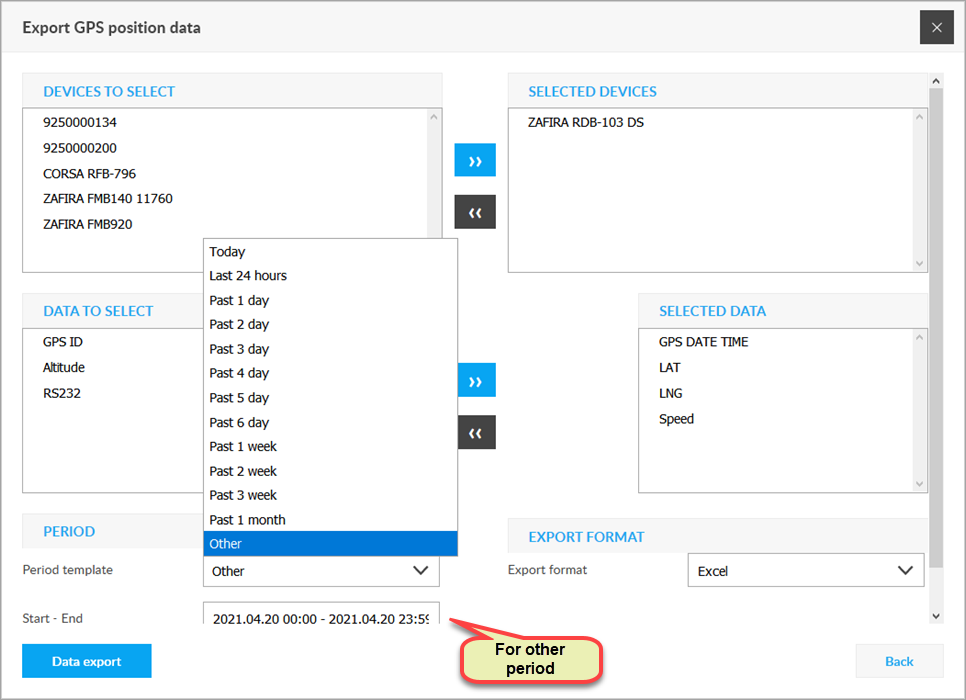
Optional devices
The devices whose data we want to download. You can add a device to the selection list by double-clicking or selecting it with the right arrow, or you can also remove it from the selection list by double-clicking or the left arrow.
Optional data
Defining the range of data to download. Data can be added to the selection list with a double mouse click or, after selection, with the right arrow, or can be removed from the selection list with a double click or the left arrow.
Period
The period for which we want to retrieve data. See Setting time period.
Export format
Currently, only Excel format can be used.
Clicking the Export Data button will collect the data and make it available for download in an Excel (.xls) spreadsheet.