Managing Devices
Within groups, devices are listed in alphabetical order by name. All parts of a device header are active: providing information or launching a tap service.
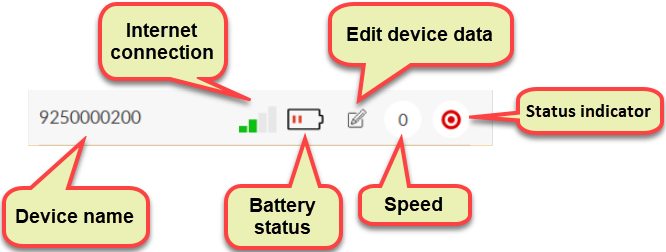
Name
Tap on the name of the device to open its data sheet, where you can view the relevant data about the device (ID, coordinate, address, network connection, etc.). The data sheet closes on another tap.
Internet connection
The existence and strength of the device's internet connection.
Battery level
Device battery charge. If the signal is red, the voltage level has dropped below 20%.
Edit device information
View and modify various device data and data groups (see Editing devices).
Speed
If the device is moving, you can read its current speed from here.
Status
The status indicator shows the status of the device and the network connection and data traffic in four colors. The status is queried automatically at certain intervals, but you can update the data immediately by tapping the indicator (the icon flashes for a few seconds and then sets).
- Green: The device is operating continuously.
- Yellow: The device still sent data within 3 minutes.
- Blue: The device does not receive a GPS (satellite) signal.
- Red: The device has not sent data for more than 1 day.
- Gray: The device has never sent data.