Event Log
During the tracking process, various events occur in connection with the GPS device and the use of the system. These are logged and can be viewed by tapping the icon at the top right of the screen ( ).
).
Event list parameters
To retrieve events, you must specify certain parameters in the panel that appears.
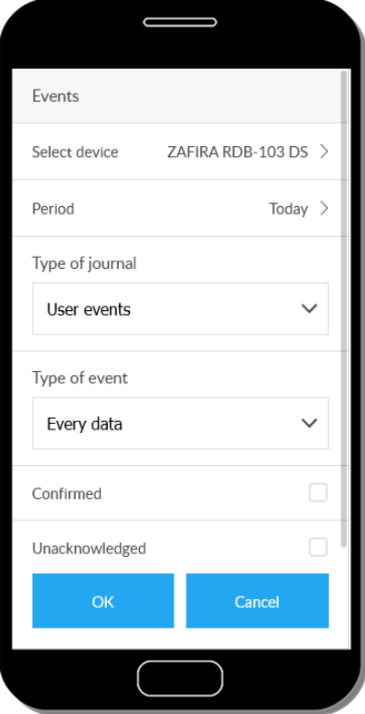
Device selection
Select which GPS device events you want to view.
Period
We specify the period for which we are interested in the events. See Specify time period.
Log type
The system classifies events into three groups: command, device, and user events.
- Command events: responses and results related to commands sent to the GPS device.
- Device events: events detected by the GPS device (eg ignition switch, door opening).
- User events: certain actions performed by the user (eg logging in to the system).
The system will display events for the selected type.
Event type
If you select device events, you can narrow the list of events in the list.
Acknowledged / unacknowledged
You can acknowledge the events that appear in the event list (note). This allows us to separate previously viewed and newer events, we have the option to display only one group, only the other.
Tap OK to display the event list. There may be no events matching the specified parameters - in this case we will get the corresponding feedback instead of the list.
Managing the event list
The displayed events can be acknowledged (Acknowledge button) - this allows you to mark what you have already seen, separating them from the new ones.
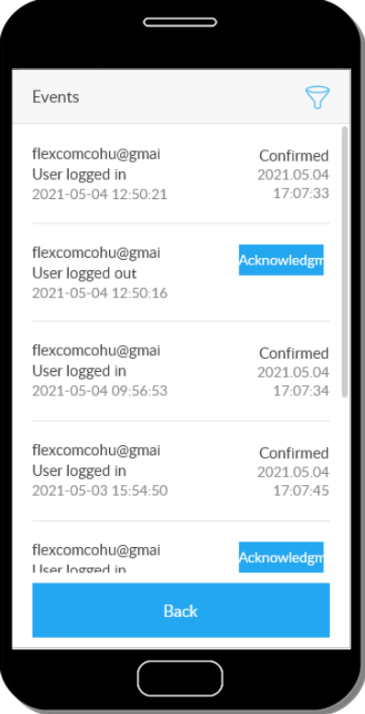
In the Event List Parameters panel, you can also filter the event list by acknowledgment status.