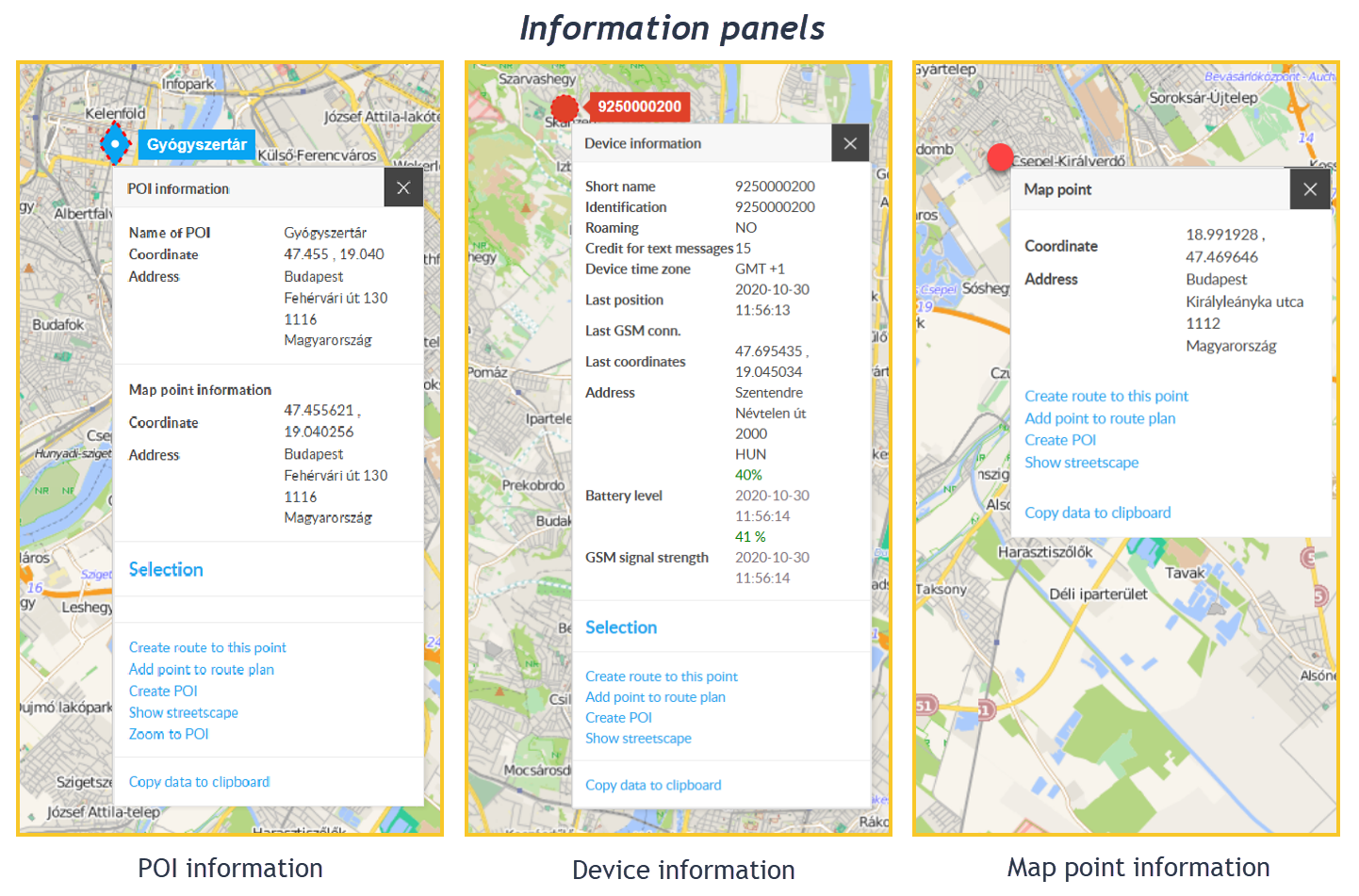
Information panels provide information about individual objects in the program (map, devices, routes, POIs, etc.) and allow you to initiate certain actions.
Contents of the information panel
The information panel contains, on the one hand, information about the object in question and, on the other hand, allows certain special operations that can be interpreted in relation to the given object. General structure of information panels:
The information section contains the data of the clicked object. The operations section is further divided into three sections: the default operation, advanced operations, and copying.
Default action: the action that would have been performed if the object had been left-clicked instead of the right mouse button.
Advanced action: here you can initiate actions related to the object or situation you clicked, for example: Get directions here, create a POI at this position, Show street view, etc.
Copy data to clipboard: Copy the data shown in the information section - then paste it into other documents.
You can start operations with a left mouse click. Some operations require prerequisites to work - if they do not exist, the operation is disabled. You can read specifics about these prerequisites in the chapters of the various objects.
An information panel can be displayed for several elements of the system, such as: map, vehicles, POIs, road sections, vehicle menu, POI panel, route planner, etc. To open the panel, right-click on the item in question.
From anywhere on the panel, except for the action menu items, you can move it anywhere by holding down the left mouse button.
You can close the panel with the X button in the upper right corner. In addition, the panel closes automatically if you deselect the “host” object.
By right-clicking on a point on the map, the following information panels can be displayed (depending on what is located at that point):
Map point information panel
Device information panel
Road section information panel
Waiting point information panel
Chart information panel
POI information panel
Depending on the subject, information panels can contain different data and functions, such as:
At the bottom of the information panels, also depending on the subject, there are the following functions:
Reload (on the data sheet, in the place of the Address): For performance optimization reasons, the system does not calculate the address automatically in some cases - click here to initiate this.
Select / Deselect: Select a device or deselect it.
Itinerary here: If you have previously selected the device and right-clicked on another point on the map, selecting this function in the Point information panel that appears will give you a route plan from the device to this point.
Transfer point to route plan: When creating a route plan, you can transfer a clicked point on the map to the plan.
Create POI: Create a POI at a specific map point.
Show street view: Click on the link to see a view of that location (if it's on Goggle's register).
Copy data to clipboard: Copy the contents of the data sheet to the clipboard.
In the case of a POI information panel, since the POI covers an area, the panel has a dual role: on the one hand, it provides data about the POI itself, and on the other hand, the point (map point) we right-clicked and covered by the POI. Accordingly, the information panel is divided into two parts: the POI and the map point. These contain the appropriate data and operational options separately.
The POI information panel cannot be opened while editing a POI (adding a new POI or changing data).