
POI import table
The internal structure of the Excel table containing the POIs to be imported is fixed, it is the same as the table generated by the Export function. You can use it to download a template from the system, which is already structured and used to import POIs.
Structure and content of the import table

The table consists of two rows of headers, the first of which contains column headings that are easy for users to understand. This line is not used by the import function, but it is required. The second line contains information of primary importance to the system, deleting or modifying it will result in the import failing.
Additional lines can be used to enter data for POIs. The system processes the table up to the first empty row, so make sure there are no such rows between POIs.
Example of a completed table:
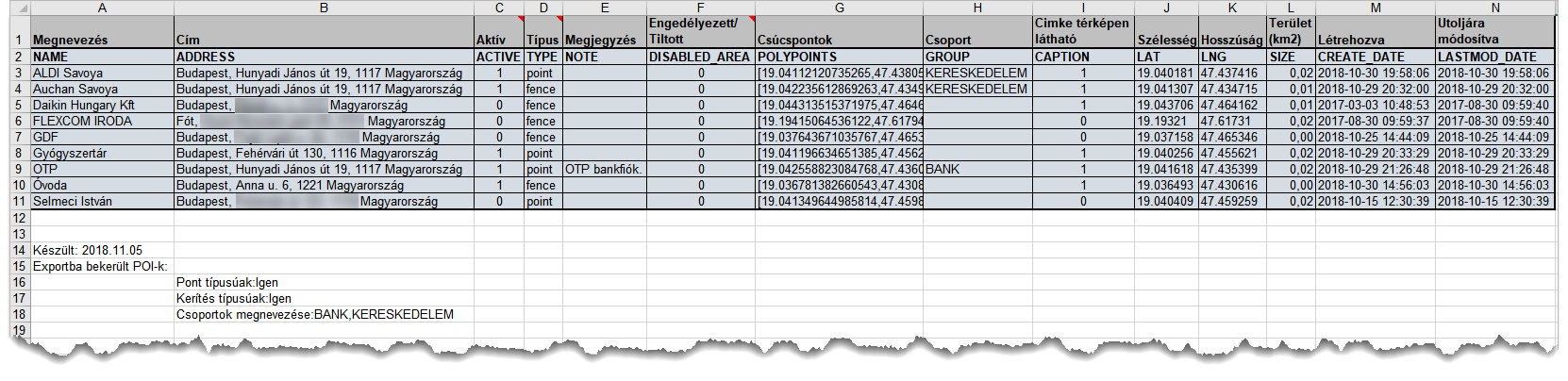
Evaluate the data in the table according to their importance
Among the POI data, they are important and less important for the operation of the system. In this respect, POI data can be divided into three groups.
Critical information
We consider critical data to be incorrect or incomplete, which would jeopardize the operation of the system - therefore, if the system detects a problem with any of these during import, it will abort the process and restore the POI record to its original state before the import started.
The following data from the table are considered critical data:
- Type
- Polypoints
- Name
- Position (latitude and longitude coordinates)
- Title
- Active
- Disabled Area
Data required, but can be corrected by the system in case of error
It is necessary, but in case of a problem, the system can correct the data that is necessary for the correct operation, but its incorrect or missing values can be corrected or replaced by the system so that it does not cause any further interruptions, or the user can easily change them later. Such data:
- Group (if it is missing or if a group does not exist in the system, it will be added to the ungrouped for a new POI, it will keep the original value for an existing one).
- Label visibility (in case of an incorrect value or missing it gets a value of Yes for a new POI, retains the previous setting of the POI for an existing one.
Descriptive data
The absence of descriptive data or any of its contents does not affect the operation of the system, it is not checked by the import process. Descriptive data:
- POI description
Tracking easily and efficiently


